
 lily 2016-12-13
$(document).on({'mousemove': function (e) {
  if (!!this.move) {
    var posix = !document.move_target ? {'x': 0,'y': 0} : document.move_target.posix,
    callback = document.call_down || function () {
      $(this.move_target).css({
        'top': e.pageY - posix.y,
        'left': e.pageX - posix.x
      });
    };
    callback.call(this, e, posix);
  }
}, 'mouseup': function (e) {
    if (!!this.move) {
      var callback = document.call_up || function () {};
      callback.call(this, e);
      $.extend(this, {
        'move': false,
        'move_target': null,
        'call_down': false,
        'call_up': false
      });
    }
  }
});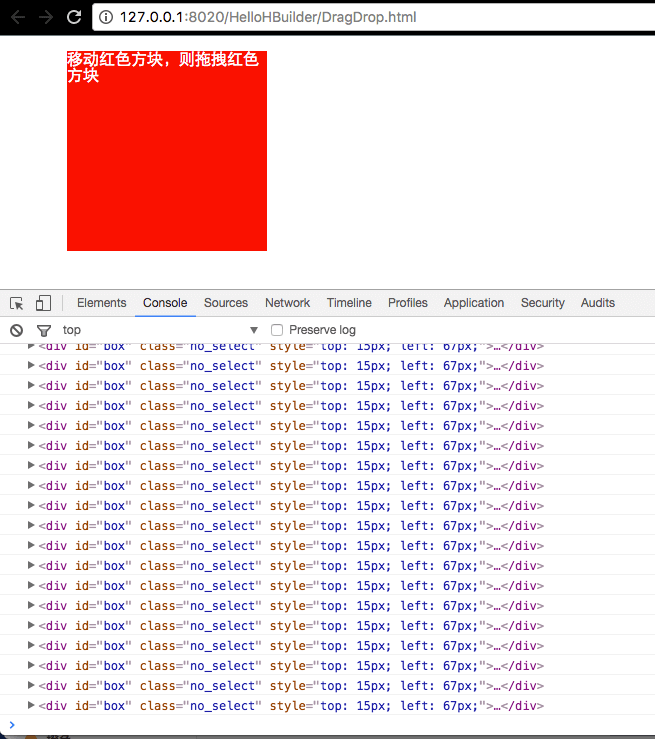
将代码剥离,只要写5行就可以实现拖拽了,是不是很简单:
$('#box').mousedown(function(e) {
  var offset = $(this).offset();
  this.posix = {'x': e.pageX - offset.left, 'y': e.pageY - offset.top};
  $.extend(document, {'move': true, 'move_target': this});
});
放大、缩小
我们给拖拽增加点功能,支持放大、缩小,先看实例图:
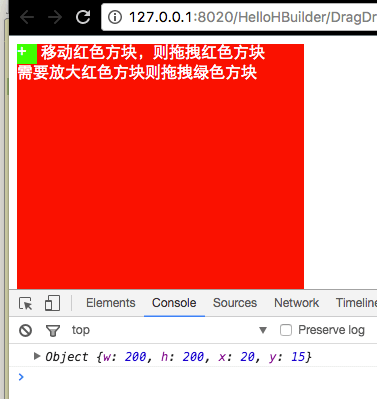
将代码剥离,原先的代码保留不变,增加一个绑定事件:
var $box = $('#box').on('mousedown', function (e) {
  var offset = $(this).offset();
  this.posix = {'x': e.pageX - offset.left, 'y': e.pageY - offset.top};
  $.extend(document, {
    'move': true,
    'move_target': this
  });
}).on('mousedown', '#coor', function (e) {
  var posix = {
    'w': $box.width(),
    'h': $box.height(),
    'x': e.pageX,
    'y': e.pageY
  };
  $.extend(document, {
    'move': true,
    'call_down': function (e) {
      $box.css({
        'width': Math.max(30, e.pageX - posix.x + posix.w),
        'height': Math.max(30, e.pageY - posix.y + posix.h)
      });
    }
  });
  return false;
});
原理分析:
放大、缩小、拖拽都离不开在网页上拖动鼠标,对于前端来说就是document的mousemove,当鼠标在网页上移动的时候,无时无刻不在触发mousemove事件,当鼠标触发事件时,什么时候需要执行我们特定的操作,这就是我们要做的了。我在mousemove中增加了几个对象来判定是否进行操作:
move:是否执行触发操作
move_target:操作的元素对象
move_target.posix:操作对象的坐标
call_down:mousemove的时候的回调函数,传回来的this指向document
call_up:当鼠标弹起的时候执行的回调函数,传回来的this指向document
小提示:
简单的操作,只需要设定move_target对象,设置move_target的时候不要忘记了move_target.posix哦;
复杂的操作可以通过call_down、call_up进行回调操作,这个时候是可以不用设置move_target对象的
拖拽和放大、缩小实现了,但是有个问题,当我们鼠标点击并滑动的时候,是会选中文本的,为了避免这个问题,大家可以自行百度
css 阻止文本选中
.no_select{
  -webkit-user-select: none;  /* Chrome all / Safari all */
  -moz-user-select: none;     /* Firefox all */
  -ms-user-select: none;      /* IE 10+ */
  user-select: none;          /* Likely future */
  cursor: default;
}
附上整个例子源码,新建个 HTML 文件粘贴进去,浏览器打开,即可操作测试:
<!DOCTYPE html>
<html>
<head>
  <meta charset="UTF-8">
  <meta name="author" content="http://orzcss.com/">
  <title>24行代码,让你的网页元素任意放大、缩小、拖拽、移动</title>
  <style>
    .no_select {
      -webkit-user-select: none;
      -moz-user-select: none;
      -ms-user-select: none;
      user-select: none;
      cursor: default;
    }
#box {
      background: red;
      cursor: pointer;
      color: #fff;
      height: 200px;
      position: absolute;
      width: 200px;
    }
    #coor {
      background: #0f0;
      cursor: move;
      display: inline-block;
      height: 20px;
      width: 20px;
    }
  </style>
</head>
<body>
  <div id="box">
    <a id="coor">+</a>
    移动红色方块,则拖拽红色方块<br>需要放大红色方块则拖拽绿色方块
  </div>
  <script src="http://www.orzhtml.com/wp-content/themes/orzhtml1.0/jquery/1.8.3/jquery.js?ver=1.0"></script>
  <script>
    $(document).on({'mousemove': function (e) {
      if (!!this.move) {
        var posix = !document.move_target ? {'x': 0,'y': 0} : document.move_target.posix,
        callback = document.call_down || function () {
          $(this.move_target).css({
            'top': e.pageY - posix.y,
            'left': e.pageX - posix.x
          });
        };
        callback.call(this, e, posix);
      }
    }, 'mouseup': function (e) {
        if (!!this.move) {
          var callback = document.call_up || function () {};
          callback.call(this, e);
          $.extend(this, {
            'move': false,
            'move_target': null,
            'call_down': false,
            'call_up': false
          });
        }
      }
    });
    // 例子测试
    var $box = $('#box').mousedown(function (e) {
      var offset = $(this).offset();
      this.posix = {
        'x': e.pageX - offset.left,
        'y': e.pageY - offset.top
      };
      $.extend(document, {
        'move': true,
        'move_target': this
      });
    }).on('mousedown', '#coor', function (e) {
      var posix = {
        'w': $box.width(),
        'h': $box.height(),
        'x': e.pageX,
        'y': e.pageY
      };
      $.extend(document, {
        'move': true,
        'call_down': function (e) {
          $box.css({
            'width': Math.max(30, e.pageX - posix.x + posix.w),
            'height': Math.max(30, e.pageY - posix.y + posix.h)
          });
        }
      });
      return false;
    });
  </script>
</body>
</html>
网页的放大、缩小、拖拽事件就研究到这里了~~